iDebit is simple and practical. If you sign up for an iDebit account, it will work in a similar way to popular online e-wallets like PayPal or Neteller – even if it doesn’t quite have the same scope as those companies yet.
Instead, iDebit is exclusively available to Canadians, since it operates in partnership with the online banking of the following Canadian banks:
- Bank of Montreal
- Canadian Imperial Bank of Commerce
- Desjardins
- National Bank
- Royal Bank of Canada
- Scotiabank
- Simplii Financial (formerly PCF)
- TD Canada Trust
How to deposit at iDebit Casinos
If you want to use iDebit to fund your online betting site, you actually have two options available. We’re going to cover them both here since each one will be useful depending on the player.
- First of all, you can sign up for an account with iDebit. Having an iDebit account is a little like having an account with an online e-wallet – you can top up your iDebit and use it as a place to store your money online, as well as making transfers and payments from your account.
- Your iDebit account will be directly linked to your online banking, and you’ll need to type in your personal banking details to connect the two. You can choose which personal account to use to top up your iDebit account, and when you transfer money it will appear in your iDebit instantly.
Once your iDebit account is topped up, you’re ready to make a deposit in your online casino.
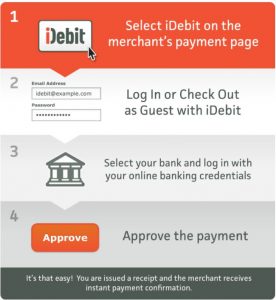
- In the cashier or banking section of your casino account, look for the iDebit deposit option. Type in how much you want to deposit, and click confirm. You’ll be redirected to a new page, where you can sign in using your iDebit credentials.
- All you need to do is confirm the transfer from iDebit and your money will be deposited into your casino account right away.
If you prefer not to sign up to iDebit, you can still use it as a casino payment option.
In this case, when you are redirected to log into your iDebit account you can choose the option to pay as a guest. You’ll be prompted to choose your bank before signing in with your online banking information. Again, all you need to do is confirm the payment and the money will be sent directly from your bank account – via iDebit – to your casino.
If you only use iDebit as a guest you won’t be able to use the service to withdraw your winnings, and guest payments are subject to a fee of $1.50. More on that later.
How to Withdraw Money at iDebit Casinos
If you’ve signed up, you’ll be able to send transfers smoothly from your casino account back into your iDebit.
- The process is very similar to depositing. Just find the iDebit withdrawals options and type in the amount you want to cash out. You’ll be redirected to sign in to your iDebit account and confirm the transfer.
- Once your winnings are safely back in your iDebit account, you can transfer them into your bank account via your online banking if you wish.
However, as we’re going to come on to, there are fees for sending money to and from your iDebit and online banking. Bearing that in mind, we find it generally makes sense to just leave our money in our iDebit account, unless we need it for something specific.
Both depositing and withdrawing via iDebit are exceptionally easy. Secure and smooth transactions are a priority for Canadian players, and iDebit comes with the benefit of being directly connected to your online banking while also acting as a buffer of security between your bank and casino.
 iDebit Casinos
  Using iDebit for casino transactions is fast, easy, safe and free.









 Both iDebit and
  iDebit actually came after Instadebit. Instadebit is more primarily
 Following the above details, we’ve collected some of the foremost advantages of iDebit casinos payments in just a few points. These are a few of the reasons why many players have turned to iDebit services over the years: